Your website needs rebuilding, and two agencies have given you two different answers. One swears by WordPress. The other builds everything on Webflow. Both platforms can run a good business website, so the real question is which one suits the way your business works.
Here's the short answer to Webflow vs WordPress. Webflow suits most service businesses that want a fast, secure marketing site they can edit without calling a developer. WordPress suits businesses that need a large online store, unusual custom features, or complete control over their hosting. For a typical tradie, clinic, or professional services firm, Webflow is usually the simpler and safer choice.
We build on Webflow, so we have a view. This guide explains why, and it's also honest about when WordPress is the better pick. It covers what each platform costs to run, security, SEO, and day-to-day editing.
Webflow vs WordPress at a glance
How the two compare for an established business website
| Webflow | WordPress | |
|---|---|---|
| Type | Cloud-based: hosting is included | Self-hosted: you arrange hosting |
| Software cost | Monthly plan, billed in US dollars | Free, open source software |
| Updates and security | Handled by Webflow | Your job, or your developer's |
| Plugins | Few needed; most features built in | Thousands available, each one to maintain |
| Editing content | Edit text and images on the page itself | Edit in the admin dashboard |
| Best for | Service businesses and marketing sites | Large stores and highly custom sites |
What Webflow and WordPress actually are
A content management system (CMS) is the software you use to publish and update your website. The Australian Government's guide to setting up a business website splits them into two kinds. A cloud-based CMS is a paid subscription that usually includes hosting. A self-hosted CMS is an application you install on a separate hosting service.
Webflow is a cloud-based platform for designing, hosting, and managing websites. You pay a monthly plan, and Webflow looks after the servers, the security certificate, and the software updates.
WordPress is free, open source software that you install on hosting you choose and pay for. It's the most common CMS by far: W3Techs reports that WordPress runs 40.1% of all websites, and 58.6% of the sites whose CMS it can identify.
That difference, cloud-based versus self-hosted, explains most of what follows. It affects what you pay, who keeps the site secure, and how much upkeep the site needs.
What each platform costs to run
Neither platform is free once you add everything a business site needs. The costs just land in different places.
What it costs to run each platform
Running costs only, not the cost of the build
| Cost | Webflow | WordPress |
|---|---|---|
| Software | Included in the site plan | Free |
| Hosting | Included in the site plan | Typically $20 to $60 a month in Australia |
| Site plan | US$15 a month (Basic) or US$25 a month (Premium, with CMS), billed yearly | Not applicable |
| Premium themes and plugins | Rarely needed | Often $100 to $500 a year |
| Updates and security | Included | Your time, or a monthly maintenance fee |
Webflow charges per site. According to Webflow's pricing page, the Basic plan costs US$15 a month and the Premium plan, which includes the CMS for things like blog posts, costs US$25 a month, both billed yearly. Prices are in US dollars, with applicable taxes added at checkout, so the Australian dollar amount moves with the exchange rate.
WordPress costs nothing to download, but a business site still needs hosting, a theme, and usually several premium plugins. The hosting and plugin figures above are typical Australian ranges, not quotes. The biggest cost is often maintenance: someone has to update WordPress, the theme, and every plugin, then check nothing broke.
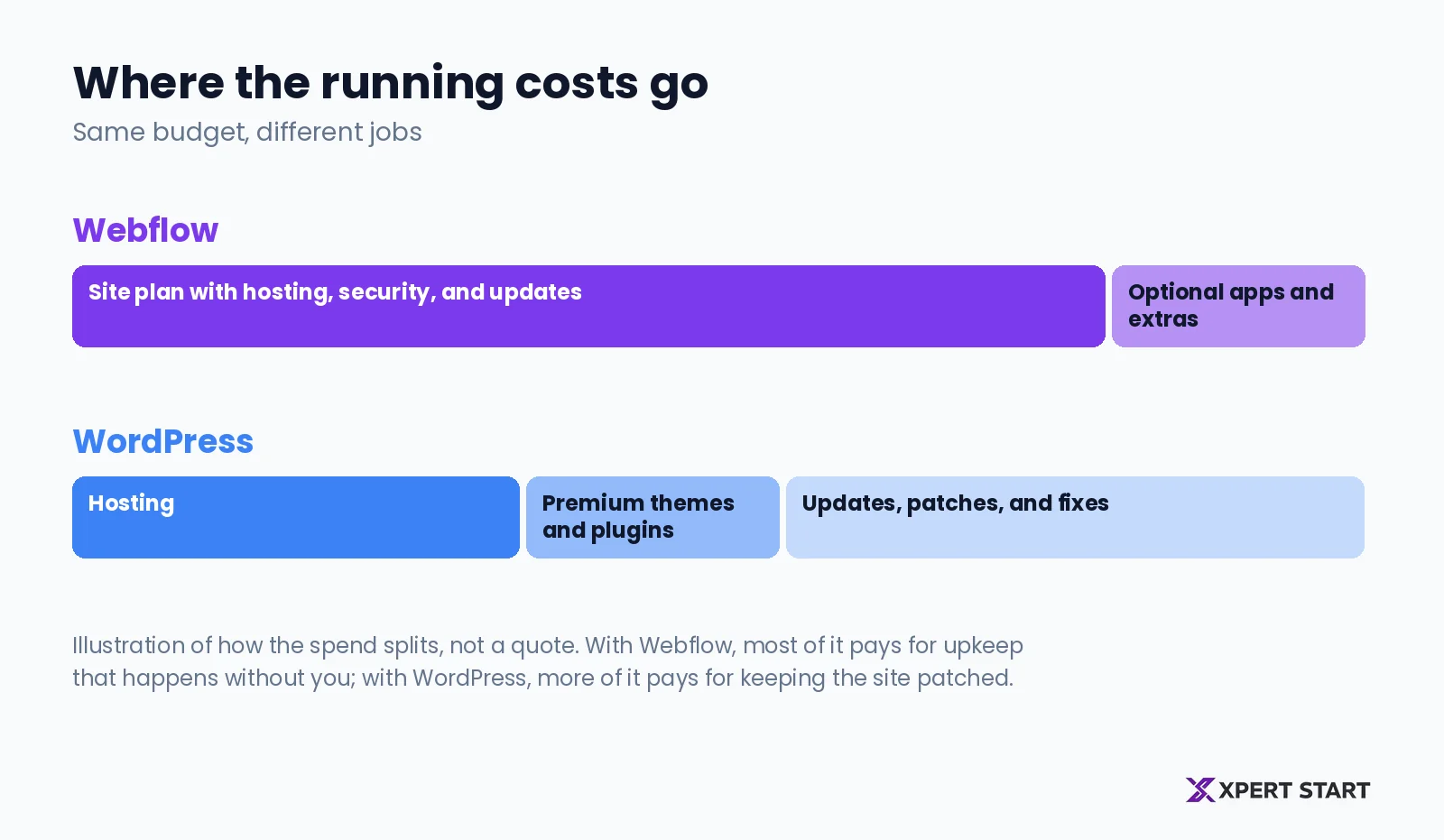
Over a few years, the totals often end up similar. The difference is what you get for the money. With Webflow, most of the spend covers hosting and upkeep that happen without you. With WordPress, more of the spend goes on keeping the site patched and working. For what the build itself costs, see our guide to website cost in Australia.
Security and maintenance
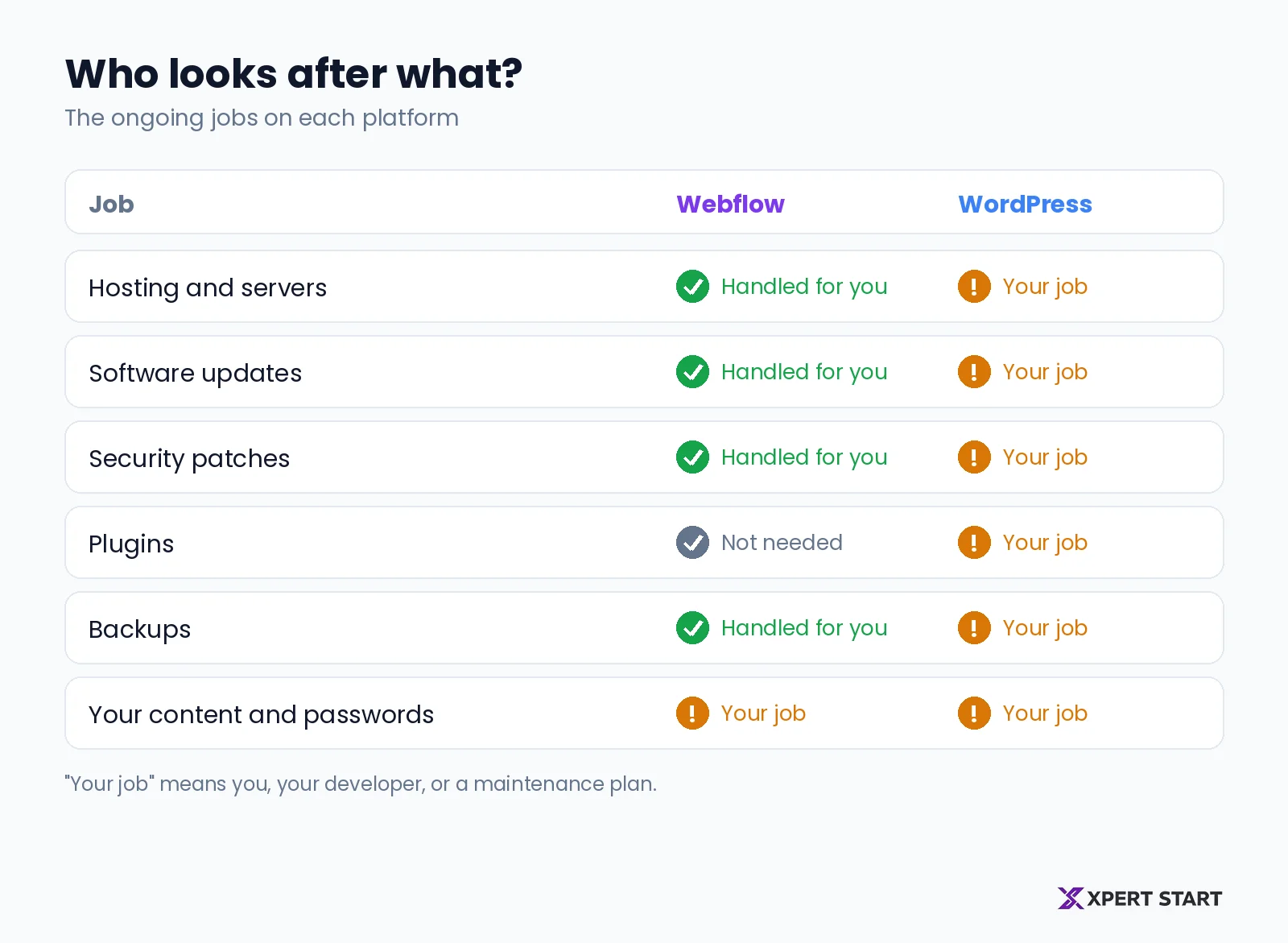
Security is where the two platforms differ most for a business owner.
On a self-hosted platform, keeping the software patched is your responsibility. The business.gov.au guide says it plainly: if your website is self-hosted, you need to keep your CMS and tools up to date by applying security patches as they come out.
For WordPress, the risk sits mostly in plugins, not in WordPress itself. Patchstack's State of WordPress Security report found 11,334 new vulnerabilities across WordPress sites, themes, and plugins in 2025. Of those, 91% were in plugins and 9% were in themes, while WordPress core had only six, all low priority.
That's why a well looked after WordPress site can be perfectly safe, and a neglected one is a common target. The more plugins a site runs, the more there is to update.
Webflow takes that job off your list. There are no plugins to patch, and Webflow handles the hosting, security certificate, and platform updates. Your remaining jobs on either platform are the same: use a strong password, turn on two-factor login, and limit who has access.
Which is better for SEO?
Both platforms can rank well on Google. Google ranks pages, not platforms, so what matters is the basics: fast pages, clean structure, useful content, and good links.
Is Webflow good for SEO? Yes. You control page titles, meta descriptions, headings, image alt text, and redirects, and Webflow creates your sitemap automatically. Because hosting and code are built in, Webflow sites tend to load quickly without extra speed plugins.
WordPress can do all of this too, usually with an SEO plugin such as Yoast or Rank Math. Those plugins are powerful, especially for very large content sites. The trade-off is that speed depends heavily on your hosting, theme, and how many plugins are running.
In practice, the site that ranks better is the one with better content and fewer technical problems. A technical SEO audit shows what to check on either platform.
Editing your website day to day
This is where many owners feel the difference most.
In Webflow, your team can edit text and images directly on the page, seeing exactly what visitors will see. Blog posts, team profiles, and case studies live in the CMS, with simple forms for each one. The design stays locked, so nobody accidentally breaks the layout.
In WordPress, you edit through the admin dashboard, usually with a page builder. It's flexible and familiar to many people, but page builders can be slow, and a plugin update can change how pages look.
If several people in your business update the website, Webflow's editor is usually easier to hand over.
Design works differently too. Webflow lets a designer control every detail of the layout without being boxed in by a theme, so the finished site can match your brand exactly. WordPress sites usually start from a theme or page builder, which is quicker for a standard look but harder to make truly your own.
When WordPress is the better choice
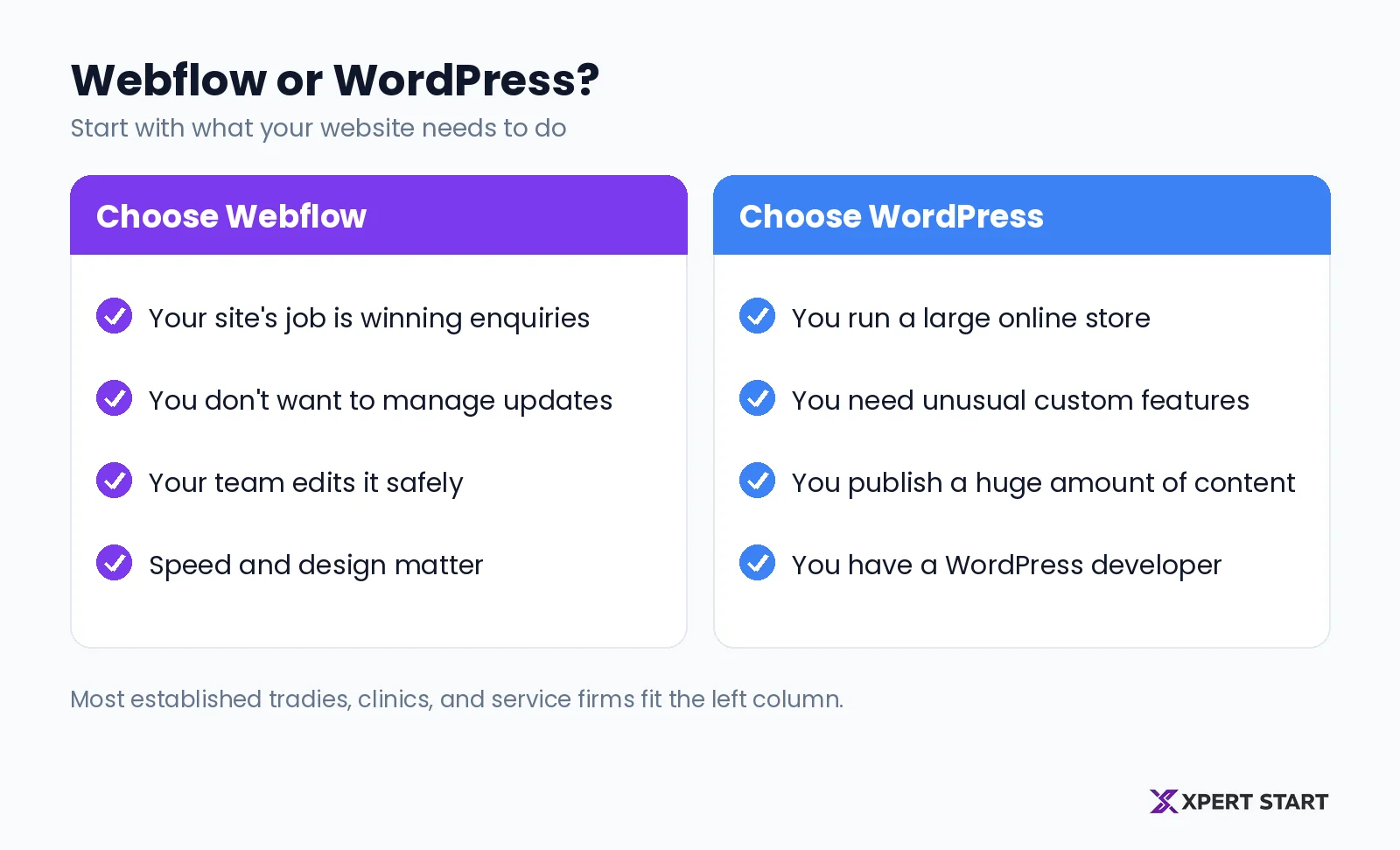
WordPress is the better pick in some situations. Choose it when:
- You run a large online store. WooCommerce on WordPress handles big catalogues and complex stock better than most alternatives.
- You need unusual custom features. Membership portals, complex booking logic, or deep integrations with other systems are often easier with WordPress.
- You publish a huge amount of content. Very large news or resource sites can outgrow Webflow's CMS limits.
- You already have a WordPress developer in house. If someone on staff maintains it well, switching may not be worth it.
Choose Webflow when:
- Your website's job is to win enquiries. Service pages, case studies, reviews, and a clear call to action are exactly what Webflow does well.
- You don't want to manage updates. No plugins to patch and no hosting to arrange.
- You want your team to edit it safely. On-page editing without risk of breaking the design.
- Speed and a polished design matter. Clean code and fast hosting come built in.
For most established tradies, clinics, and professional services firms, that second list describes the business. That's why we build on Webflow.
Moving from WordPress to Webflow
Many businesses that come to us are on an ageing WordPress site that's slow, hard to update, or was built by someone who's moved on. Moving to Webflow is a rebuild rather than a copy, so it's the right moment to fix the structure and content too.
The part that matters most is protecting your Google rankings. Every old address needs a permanent redirect to its new page, and titles and descriptions need carrying across. Our guide to website redesign cost covers what a move like this costs and how to protect your rankings along the way.
Frequently asked questions
Is Webflow better than WordPress?
For most service businesses, Webflow is the simpler and lower maintenance choice, because hosting, security, and updates are built in. WordPress is better for large online stores, highly custom features, or very large content sites.
Is Webflow more expensive than WordPress?
Webflow's site plans start at US$15 a month billed yearly, with hosting included. WordPress software is free, but hosting, premium plugins, and maintenance add up, so the running costs often end up similar. The difference is how much of that work you have to manage.
Is WordPress or Webflow better for SEO?
Neither platform ranks better on its own. Both let you control titles, descriptions, headings, and redirects. Webflow sites tend to be fast without extra plugins, while WordPress relies on good hosting and an SEO plugin.
Is Webflow easier to use than WordPress?
For day-to-day edits, usually yes. Your team changes text and images on the page itself, and the design can't be broken by accident. Building a Webflow site from scratch takes design skill, which is why most businesses have an agency build it and then edit it themselves.
Is Webflow secure?
Yes. Webflow handles hosting, security certificates, and platform updates, and there are no plugins to patch. You still need a strong password, two-factor login, and sensible access control.
Can I move my WordPress site to Webflow?
Yes. The site is rebuilt in Webflow rather than copied across, and every old page address needs a redirect so you keep your Google rankings.
The bottom line
Webflow and WordPress are both capable platforms. The right one depends on what your website needs to do and how much upkeep you want to take on.
For a business whose website exists to win enquiries, Webflow usually wins on speed, security, and ease of editing. WordPress earns its place for large stores, unusual custom features, and teams that already run it well.
Not sure which suits your business? Our free digital audit looks at your current site, your rankings, and what you need it to do, then gives you a straight recommendation. Book your free digital audit, see how our Webflow web design works, or read about us.