If you've been told Google Ads is too expensive for a small business, you've probably been talking to the wrong people.
Some businesses get excellent returns from it. Others burn through their budget in 30 days and see nothing. The difference isn't the platform. It's whether the business was set up to use it properly.
This guide covers what Google Ads actually costs in Australia, which businesses see the best results, and how to set up a campaign that doesn't bleed money from day one.
Key Takeaways
- In 2026, Australian businesses earn an average of $2 for every $1 spent on Google Ads (UpROAS, 2026)
- Average CPC ranges from $1.66 (eCommerce) to $10.61 (Legal) in Australia (Digital Autopilot AU, 2025)
- 68% of small businesses see positive ROI after 6+ months, but 45% fail within the first 90 days (Digital Autopilot AU, 2025)
- Most Australian SMBs should budget $1,500–$5,000 per month to run viable campaigns
How Much Do Google Ads Cost in Australia?
In 2026, Australian businesses pay anywhere from $1.66 to $10.61 per click depending on their industry, according to Digital Autopilot's 2025 Australian Google Ads guide. That's a massive range. Before you commit a dollar, you need to know where your industry sits.
Here's how it works. Google Ads runs on a cost-per-click model. You bid on keywords and only pay when someone clicks your ad. No clicks, no cost. What determines your CPC is how competitive your keywords are and how relevant Google thinks your ad is to the person searching.
Here are the average CPCs for Australian industries in 2025, sourced from Digital Autopilot and NetStripes:
High CPCs aren't automatically bad. A legal firm paying $10.61 per click only needs one client from every 20–30 clicks to turn a profit. A plumber at $5 per click on a $300 callout is in the same boat.
The number that actually matters isn't the CPC. It's your cost per lead and your average job value.
In 2025, the average Google Ads CPC in Australia ranged from approximately $1.66 for eCommerce businesses to $10.61 for legal services, according to Digital Autopilot's Australian Google Ads analysis. High-CPC industries like legal and finance can afford to pay more per click because their average transaction values are far greater than what you'd see in retail or hospitality.
learn how keyword selection affects your cost per click
Is Google Ads Worth It for Australian Small Businesses?
In 2026, businesses earn an average of $2 for every $1 spent on Google Ads, according to UpROAS's Google Ads statistics report, which draws on data from WordStream and Google's own economic impact studies. Google Search campaigns average a 5.17:1 ROAS, meaning $5.17 back for every dollar in, based on 3P Digital's 2025 Australian performance marketing benchmarks.
Those averages tell half the story.
In 2025, 68% of small businesses reported positive Google Ads ROI after six or more months of consistent spending. The other 32%? Most of them were in the 45% that quit within 90 days, before their campaigns had enough data to start working (Digital Autopilot AU, 2025).
Google Ads isn't a tap you turn on and immediately get leads. The first 30–60 days are a learning phase. Your campaigns are gathering click data, figuring out which ads perform, and working out which search terms actually convert. Pull the plug before that data builds up and you've paid for research you'll never get to use.
What we see in practice: Most clients who get strong Google Ads results had a solid website before they started. Fast load times, clear calls to action, click-to-call on mobile. Get those right first. When the site's doing its job, we've seen Google Ads ROI improve within the first few weeks of a campaign.
So is it worth it for your business? That comes down to three things:
- Your average job or order value. If you're a plumber charging $250 per callout, you can afford $50–$80 per lead and still come out ahead. Selling a $29 product? The maths don't add up.
- Your website. Google Ads sends people to your site. If the site doesn't turn visitors into enquiries, you're paying for traffic that goes nowhere.
- Your patience. Businesses that stick with it for 90+ days consistently outperform those that pause and restart.
is your website converting visitors into enquiries?
What's a Realistic Monthly Budget for Google Ads in Australia?
Most Australian SMBs spend between $1,500 and $5,000 per month on Google Ads, based on data from Digital Autopilot and White Peak Digital, both 2025. Newer businesses in low-competition niches can get started at $1,000 per month. If you're in legal, finance, or construction in a major city, expect to budget $5,000–$20,000 per month to show up where it counts.
Here's a practical breakdown:
One thing that catches people out: your ad spend and your management fee are two separate costs. If you bring someone in to run your campaigns, their fee sits on top of your ad budget, typically 15–20% of spend or a flat monthly rate.
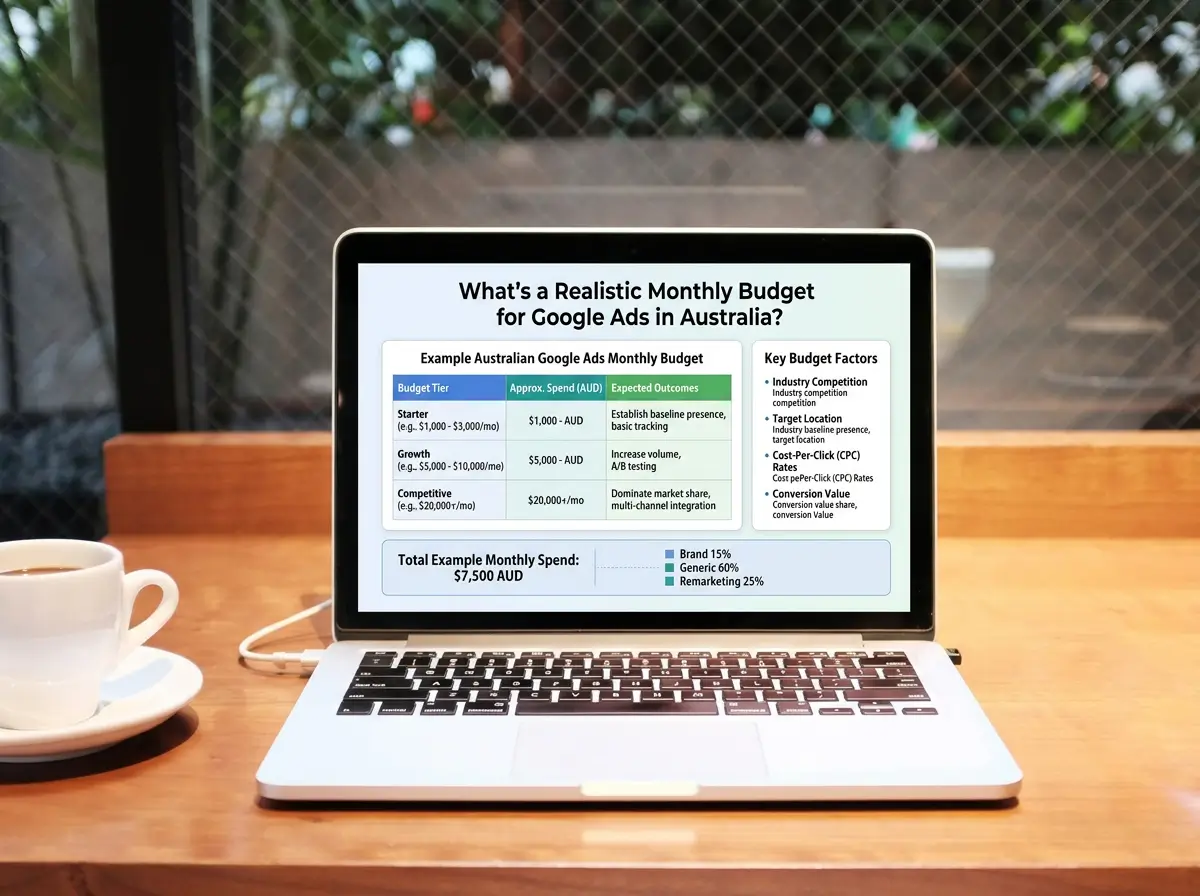
In 2025, most Australian small businesses allocated between $1,500 and $5,000 per month in Google Ads spend, according to White Peak Digital's Australian Google Ads cost analysis. Businesses in competitive sectors like legal, finance, and construction typically need $5,000–$20,000 per month to generate meaningful lead volume in metro markets.
Which Australian Businesses Get the Best Results?
In 2025, the average Google Ads conversion rate across all industries was 7.52%, up from 7.04% the previous year, according to WordStream's 2025 Google Ads benchmarks. But conversion rates vary dramatically by industry.
The pattern is clear. Service businesses with urgent local intent, tradies, mechanics, and medical businesses, convert at 11–15%. Retail and finance sit at 2–3%.
Why the gap? When someone searches "emergency plumber Sydney" or "dentist open Saturday Parramatta", they're ready to book. Not browsing. They click ads with their wallet already out.
Our observation: The businesses that struggle with Google Ads are almost always showing ads to people at the wrong stage of the buying journey. A car dealership bidding on "how does a car lease work" is paying to educate someone, not close them. Bid on intent that matches what you do. "Car lease deals Sydney" converts. "How does a car lease work" doesn't.
For Australian service businesses in trades, professional services, medical, and automotive, Google Ads is generally worth trying. For eCommerce businesses selling low-ticket items, the maths get harder and you need serious volume to make it work.
Google Ads vs SEO: Which Should You Do First?
In 2026, paid search click share doubled in several key verticals while organic search clicks fell 11–23%, according to ALM Corp's 2026 click-share analysis. AI Overviews are eating up more of the results page and pushing organic listings further down.
Here's the thing though. Google Ads and SEO aren't competitors. They run on different timelines and solve different problems.
For most established Australian SMBs, the answer is simple: run both, in sequence.
Start with Google Ads to get leads coming in. Use that revenue to fund SEO over the next 6–12 months. As SEO builds momentum, you reduce how much you're spending on paid. Eventually you've got both running: paid capturing demand, organic building authority.
If you can only pick one: choose Google Ads if you need leads this month. Choose SEO if you're playing the 12–24 month game.
understand how local SEO works for Australian small businesses
How to Set Up Google Ads for Your Small Business (Step by Step)
Google Ads can be set up in an afternoon. Setting it up well takes more thought. Here's the process without the fluff.
Step 1: Create your Google Ads account and link Google Analytics
Go to ads.google.com and create your account. Link it to your Google Analytics 4 property. This connection lets Google Ads optimise toward actual conversions, not just clicks.
Step 2: Set up conversion tracking
Tell Google what a "success" looks like. For most Australian service businesses this means:
- Phone calls from ads (set a minimum call duration; 60 seconds is standard)
- Form submissions on your contact or quote page
- Bookings if you have an online booking system
Without conversion tracking, Google Ads is flying blind. This step is non-negotiable.
Step 3: Choose your campaign type
For most small businesses starting out, Google Search campaigns are the right choice. You're targeting people already searching for what you offer. Avoid Performance Max and Display campaigns until you have 90 days of Search data. They're harder to control and easier to waste budget on.
Step 4: Build a tight keyword list
Start with 15–25 high-intent keywords. For a Sydney plumber, that means "emergency plumber sydney", "blocked drain sydney", "hot water system repair sydney", not "plumbing tips" or "how to fix a leaking tap."
Use phrase match and exact match. Broad match keywords will burn budget on irrelevant searches until you've built solid conversion data behind them.
how to find the right keywords for your business
Step 5: Write 3 ads per ad group
Each ad needs three headlines (30 characters max) and two descriptions (90 characters max). Include your primary keyword in at least one headline. Be specific: "Same-Day Plumber Sydney | Call Now for Fast Response" outperforms "Professional Plumber | Quality Service | Contact Us."
Step 6: Set your bid strategy
Start with Maximise Conversions if you have conversion tracking set up. Switch to Target CPA (cost-per-acquisition) once you have 30+ conversions. Google needs that volume to optimise effectively.
Step 7: Monitor weekly, not daily
Set your daily budget and check in once a week for the first month. Look at which search terms triggered your ads, which ads are getting clicks, and what your conversion rate is. Pause keywords that are spending without converting. Don't touch the rest.
The 45% Failure Rate: How to Avoid Wasting Your Budget
In 2025, 45% of small businesses that tried Google Ads quit within 90 days without seeing positive results, according to Digital Autopilot AU. Most made the same preventable mistakes.
Mistake 1: Sending ad traffic to a slow or unclear website
Google Ads sends clicks to your landing page. If that page loads slowly, has no obvious call to action, or doesn't match what the ad promised, visitors leave immediately. Your conversion rate drops. Your cost per lead skyrockets. Fix the website first.
Mistake 2: No conversion tracking
Without conversion tracking, you're paying for clicks with no idea which ones became enquiries. You can't optimise what you can't measure.
Mistake 3: Too many keywords, not enough budget
Spreading $1,500 per month across 80 keywords means some keywords get one or two clicks before the budget runs out. You need enough data per keyword to know whether it works. Fewer keywords, more data per keyword.
Mistake 4: Stopping too soon
The first 30–60 days are expensive and often disappointing. Google's algorithm is still learning. Campaigns that get paused and restarted over and over never build enough data to improve. Commit to 90 days before you make any judgement calls.
Mistake 5: Using the wrong campaign type
Beginners who click through Google Ads' default setup often end up with a Performance Max or Smart campaign. These give Google maximum control and minimum visibility over what you're paying for. Start with Search campaigns where you control the keywords.
Do You Need an Agency to Run Google Ads?
You don't have to hire an agency. But we've seen the difference between self-managed and professionally run campaigns, and it's real, particularly in the first 90 days when structure and keyword selection matter most.
In 2025, Google held approximately 94% of the Australian search engine market share, according to 3P Digital's performance marketing statistics. Every customer you're after is on there. The platform works. It just rewards the people who know how to run it properly.
The real value of working with someone who knows the platform isn't the initial setup. It's the weekly work: adjusting bids, cutting wasted keywords, testing ad copy, tightening targeting. That's where campaigns actually improve.
learn what ongoing digital marketing management includes
Not Sure If Your Digital Setup Is Ready?
Before you put any money into Google Ads, it's worth knowing whether your website is ready to convert the traffic it gets. A slow site with no clear call to action will waste every dollar you send its way.
We offer a free digital audit for established Australian businesses. We look at your website, your current digital setup, and where the quick wins are, before you spend anything on paid advertising.
Get your free digital audit → xpertstart.com.au
Frequently Asked Questions
How much does Google Ads cost per month for a small business in Australia?
Most Australian small businesses spend between $1,500 and $5,000 per month on Google Ads. Businesses in competitive industries like legal, finance, or construction in major cities may need $5,000–$20,000 per month to compete effectively. Your ad spend and any management fees are separate costs (White Peak Digital, 2025).
Is Google Ads worth it for tradies in Australia?
Yes. Service businesses like plumbers, electricians, and builders consistently see strong Google Ads results because search intent is high. When someone searches "emergency plumber Sydney" they're ready to book. In 2025, automotive and home services industries achieved conversion rates of 7–15%, well above the 7.52% all-industry average (WordStream, 2025).
How long does it take for Google Ads to work?
Most businesses see initial results within 1–4 weeks. However, campaigns typically need 60–90 days to fully optimise, as Google's algorithm requires 30+ conversions to use automated bidding effectively. In 2025, 68% of small businesses reported positive ROI after six or more months of consistent spending (Digital Autopilot AU, 2025).
What's the difference between Google Ads and SEO?
Google Ads delivers paid traffic immediately. You pay per click and leads can arrive within days. SEO builds organic rankings over 3–12 months and keeps paying off without per-click costs. In 2026, paid search click share doubled in key verticals while organic clicks declined 11–23% due to AI Overviews (ALM Corp, 2026). Most established businesses are better off running both.
Can I run Google Ads myself or do I need an agency?
You can set up Google Ads yourself. The platform's accessible. The risk is in campaign structure, keyword selection, and ongoing optimisation. In 2025, 45% of small businesses quit Google Ads within 90 days, often because of setup mistakes, not because the platform doesn't work (Digital Autopilot AU, 2025). If you're spending $2,000+ per month, professional management usually pays for itself.
The Bottom Line
Google Ads works. For established Australian service businesses with a solid website and a realistic budget, it's one of the fastest ways to bring in qualified leads.
But it's not automatic. The businesses that fail are the ones that set it up poorly, stop too early, or send paid traffic to a website that doesn't convert.
Get these four things right:
- A website that loads fast and turns visitors into enquiries
- Conversion tracking so Google knows what success looks like
- A budget you can sustain for at least 90 days
- Keywords targeting buying intent, not browsing intent
Nail those and Google Ads works. Miss them and you'll join the 45% who quit.
Not sure if your setup's ready? That's exactly what a free digital audit is for.
Book your free digital audit → xpertstart.com.au
read next — How much does a website cost for small Australian businesses