If customers can't find your business on Google, the problem is often the words on your website. You describe your services one way, and your customers search another way. Keyword research closes that gap.
Keyword research is the process of finding the exact words and phrases your customers type into Google, then deciding which ones each page of your website should target. For a small business owner, the goal isn't the biggest numbers. It's the searches that lead to calls, bookings, and quote requests.
This guide walks through keyword research for small business owners in Australia, step by step. It uses free tools, including the data you already have in Google Search Console, and finishes with a simple plan you can follow.
Key takeaways
- Start with what you sell, in your customers' words, not industry jargon.
- Use Search Console first. It shows the searches you already appear for, including ones you nearly rank for.
- Match every keyword to intent. Someone researching needs a guide; someone ready to buy needs a service page.
- Give each keyword one page, so your own pages don't compete with each other.
Why keyword research matters for your business
Google can only show your page for a search if the page clearly answers it. If a plumber's website says "drainage solutions" but customers search "blocked drain plumber", the site misses those customers.
Searches are also more varied than most owners expect. Google says 15% of the searches it sees every day are ones it has never seen before. And most keywords are small: Ahrefs found that keywords with fewer than 10 searches a month make up almost 93% of its US keyword database.
The Australian Government's guide to improving your search engine rankings makes the same point: matching the words on your website to the words customers search with is an important part of SEO.
That's good news for an established local business. You don't need to win the huge, competitive terms. You need to win dozens of specific searches that your ideal customers actually use.
Step 1: List what you sell, in your customers' words
Seed keywords are the short, broad phrases that describe your services. They're the starting point for everything else.
Write down every service you offer, then rewrite each one the way a customer would say it. Think about the problem they have, not the name of your service.
- A plumber might list "blocked drain", "hot water system repair", and "burst pipe".
- A physio clinic might list "sports physio", "back pain treatment", and "physio near me".
- An accountant might list "tax return", "BAS lodgement", and "small business accountant".
Add your suburbs and service areas too. Local searches like "electrician Parramatta" often bring the most valuable enquiries.
Step 2: Find the searches you already appear for
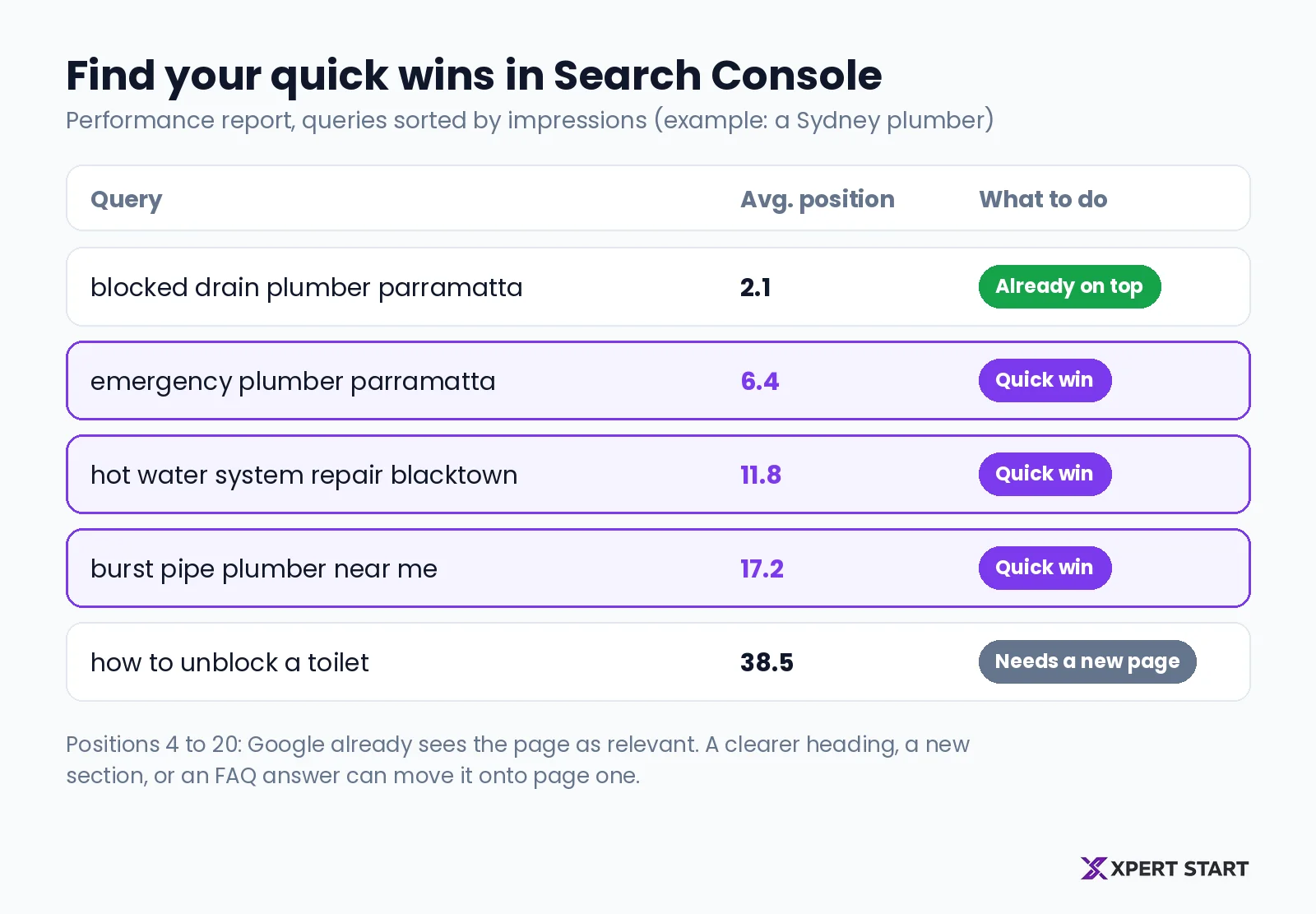
Most owners skip the best free source of keywords: their own data. Google Search Console's Performance report shows the searches your site appeared for, with clicks, impressions, click-through rate, and average position.
Here's how to use it:
- Open the Performance report and set the date range to the last three months.
- Turn on average position, then sort the queries by impressions.
- Look for searches where your average position is between about 4 and 20.
Those searches are your quick wins. Google already thinks your page is relevant, but it sits just below the top results, often on page two. A clearer heading, a short new section, or an FAQ that answers the search directly can lift it.
For example, if your site appears at position 12 for "emergency electrician Penrith", adding a section that answers that search on your emergency service page can move it onto page one.
Step 3: Expand your list with free tools
Once you've mined Search Console, widen the list with these free sources:
- Google autocomplete. Type a seed keyword into Google and note the suggestions. They come from real searches.
- People also ask. The questions Google shows in results are ready-made headings and FAQ answers.
- Related searches. The links at the bottom of a results page show how people refine their search.
- Google Keyword Planner. It suggests related keywords and estimates monthly searches. According to Google's Keyword Planner guide, you need a Google Ads account with billing details entered to use it, though you don't have to run ads.
Write everything into a spreadsheet with three columns: the keyword, where you found it, and which service it relates to.
Step 4: Match each keyword to search intent
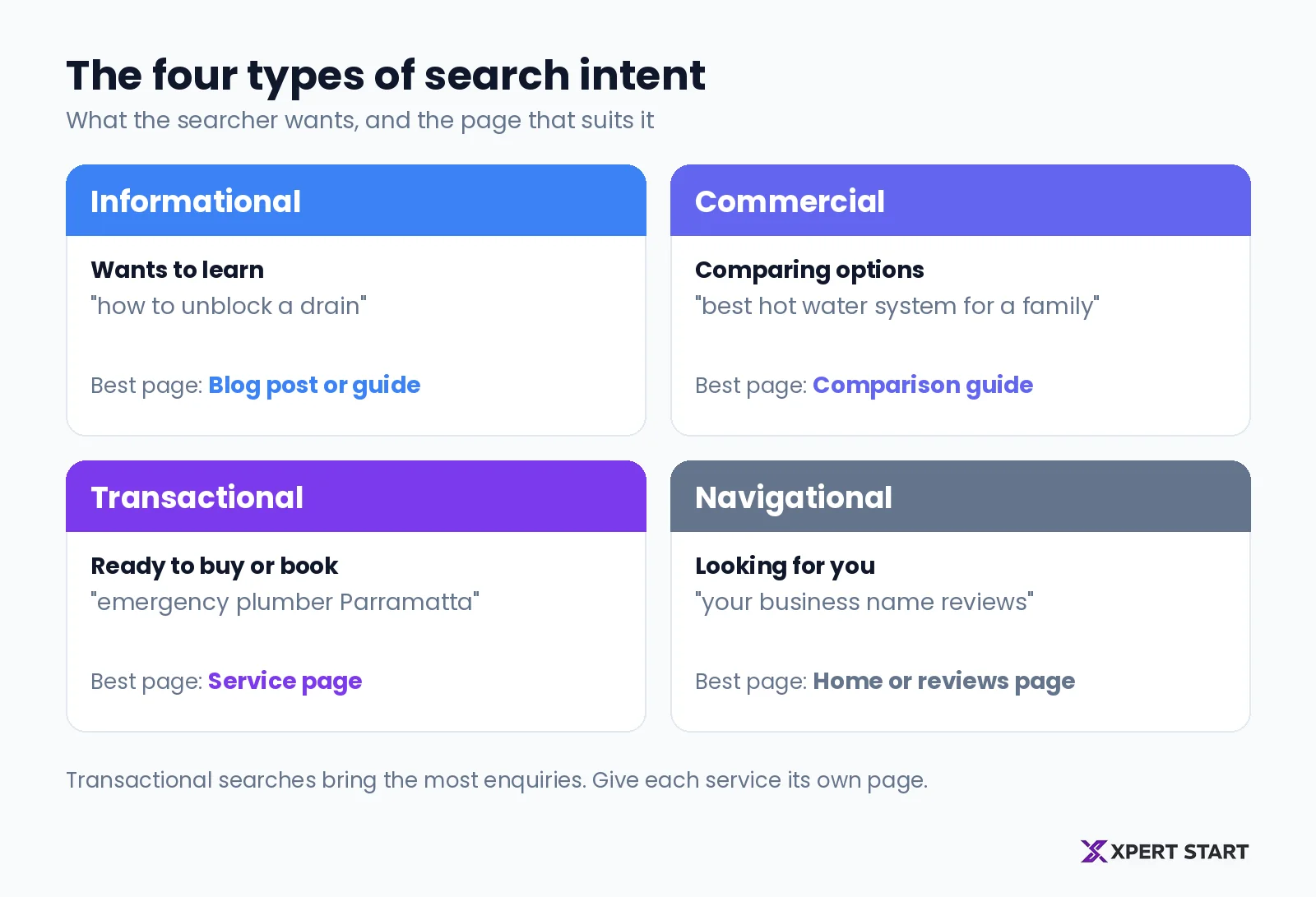
Search intent is the reason behind a search: what the person actually wants. Matching it decides whether the right page shows up.
The four types of search intent
And the page that suits each one
| Intent | Example search | Best page type |
|---|---|---|
| Informational | how to unblock a drain | Blog post or guide |
| Commercial | best hot water system for a family | Comparison guide |
| Transactional | emergency plumber Parramatta | Service page |
| Navigational | your business name reviews | Home or reviews page |
Transactional searches bring the most enquiries, so make sure each of your services has a page built around them. Informational and commercial searches suit blog posts that help people early, then link them to the right service page.
Step 5: Build a keyword strategy for your business
A list of keywords isn't a strategy. A strategy decides which keywords matter most and where each one lives on your website.
Score each keyword on four questions:
- Relevance. Does it closely match a service you actually want more of?
- Intent. Is the searcher likely to become a customer?
- Competition. Look at the first page of Google. If other local businesses and thin pages rank, you can compete. If national brands own every spot, look for a more specific version.
- Value. Would one customer from this search be worth the effort?
Then group related keywords into clusters. A topic cluster is a group of pages about one subject: a main page that covers it broadly, plus smaller posts that each answer one specific question, all linked together. This structure shows Google your site covers the topic in depth.
Step 6: Give each keyword one page
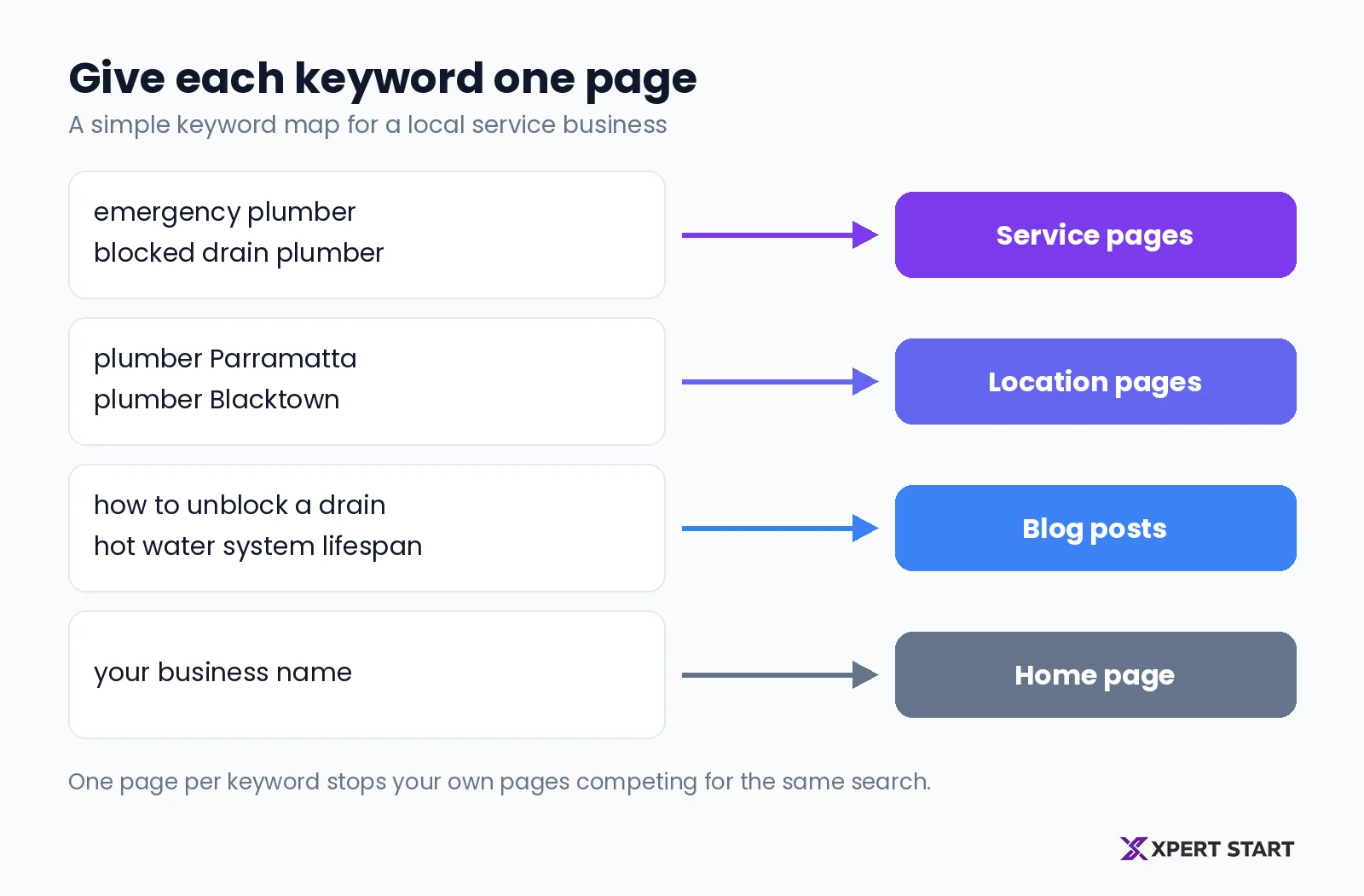
Assign every keyword, or every small group of closely related keywords, to one page. This avoids keyword cannibalisation, where two of your own pages compete for the same search and both rank lower.
- Home page: your business name and your main service in your main area.
- Service pages: transactional searches for each service.
- Location pages: service plus suburb searches, if you serve several areas.
- Blog posts: informational and commercial questions.
Once a page has its keyword, use it naturally in the page title, the main heading, the first paragraph, and the meta description. Our on-page SEO guide covers exactly where each keyword should go.
Keyword research for local businesses
If you serve a local area, local searches deserve their own list. Add your main suburbs to your core services, then check autocomplete for each combination. Many local searches also trigger the map results, which depend on your Google Business Profile as much as your website.
Our local SEO guide explains how to rank in the map results alongside your keyword work.
Common keyword research mistakes
- Chasing broad terms. "Plumber" is nearly impossible to win. "Blocked drain plumber Parramatta" is winnable and brings better enquiries.
- Ignoring Search Console. Your best opportunities are often searches you already nearly rank for.
- Writing for the keyword, not the reader. Repeating a phrase doesn't help. Answering the search clearly does.
- Targeting one keyword on several pages. Pick one page per keyword and link the others to it.
- Doing it once. Searches change, so review your keywords every three to six months.
How long does keyword research take?
For an established local business, a first round of keyword research usually takes a few hours. Mining Search Console and autocomplete for your main services is the bulk of it. After that, a quick review every few months keeps the list current.
The slower part is acting on it: rewriting service pages and publishing posts. That's where the results come from.
Frequently asked questions
How do I do keyword research for my small business?
List your services in your customers' words, check Search Console for the searches you already appear for, then expand the list with autocomplete and People also ask. Match each keyword to its intent and give it one page on your website.
Can I do keyword research for free?
Yes. Google Search Console, autocomplete, People also ask, and related searches are all free. Google Keyword Planner is free to use but needs a Google Ads account with billing details entered.
What are long-tail keywords?
Long-tail keywords are longer, more specific searches, like "hot water system repair Blacktown". Each one has fewer searches, but together they make up most search traffic, and they often bring customers who are ready to buy.
How many keywords should each page target?
Give each page one main keyword plus a few closely related variations. If two keywords need different answers, they need different pages.
How often should I redo keyword research?
Review your keywords every three to six months, and whenever you add a service or area. Check Search Console monthly for new searches you're starting to appear for.
The bottom line
Keyword research for small business owners is about finding the specific searches your best customers use, then making sure one clear page answers each of them. Start with Search Console, add autocomplete and People also ask, match each keyword to intent, and give it a home.
Want a head start? Our free digital audit shows the searches your site already appears for, the quick wins sitting on page two, and the gaps your competitors are filling. Book your free digital audit, see how our SEO services work, or work through our SEO checklist for established businesses. You can also read about us.